



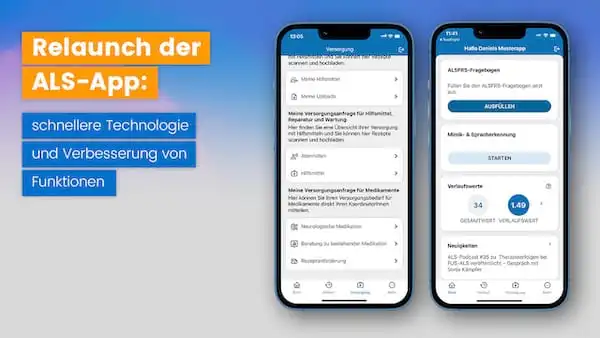
In recent years, the ALS app has become a trusted companion for people with ALS. About 1,000 members of our network use it to track the progression of their disease, assess their prognosis, and participate in care management.
With this relaunch, we’re offering faster performance and have improved several features. The latest update to the ALS app (version 5.0.0) is available for free download from the Apple App Store and Google Play. We’d like to briefly highlight the changes in the new version.
Self-assessment of the course of the disease
The layout of the questionnaire for self-assessment of disease progression (ALS Self-Rating Scale, ALSFRS) has been revised. The 12 questions in the questionnaire are now presented in a clearer format. The revision is intended to make it easier to complete the questionnaire.
Home screen of the ALS app, featuring the ALSFRS questionnaire, progress data, and news
You can access the ALSFRS questionnaire by clicking the “Fill Out” button on the home page.
Progression value
The classification of the disease progression score has been aligned with an international reference (classification according to Kimura F. et al., Neurology 2006). The disease progression score now classifies the rate of disease progression as rapid, slow, or intermediate.
If the disease progression calculator returns a value between 0.5 and 1.0, we refer to this as an intermediate disease progression. A value less than 0.5 indicates a slower disease progression, and all values greater than 1.0 indicate a faster disease progression.
Neurofilament light chain (NfL) diagram
For the past year, Neurofilament light chain (NfL) levels from the “NfL in ALS” research project have been displayed in a trend chart within the ALS app. This trend chart has been revised. By adjusting the x-axis (level of serum NfL concentration) and the timeline on the y-axis, the lab results are now displayed more clearly.
The “History” page displays the current history value and the history types.
Further down on the “History” page, you’ll find the NfL chart, vital signs, and the timeline.
Chronology of the Course of the Illness
The timeline, which provides an overview of the disease’s progression, has been made easier to navigate. In the timeline, the stages of ALS are categorized and displayed as Stages 1 through 4 according to the King’s staging system (developed at King’s College London). Users can use the timeline to find information about appropriate support services.
Scan and upload function
With the scan-and-upload feature, users of the ALS app can scan prescriptions, doctor’s notes, and other care-related documents using the app and upload them to their patient account. The scanned document is then used for specialized care management. The design and technology of the scan and upload feature have been improved.
The timeline shows the individual stages of the disease’s progression.
On the “Supply” page, you’ll find the scan and upload feature.
Thank you for your interest in the new version of the ALS app.
We thoroughly tested the new app before its release. If you do find any bugs, please let us know.
Please feel free to contact us if you have any questions.
Your APST team