



On Monday, October 12, 2026, the new assistive device module is scheduled to go live on the APST Care Portal.
The module has been completely redesigned. The goal of the redesign is to improve user-friendliness, simplify interaction with the supply processes, and provide a clearer overview of the current status of each assistive device process.
Below, we would like to introduce you to the most important new features
New Overview of Care Processes in a supply partner
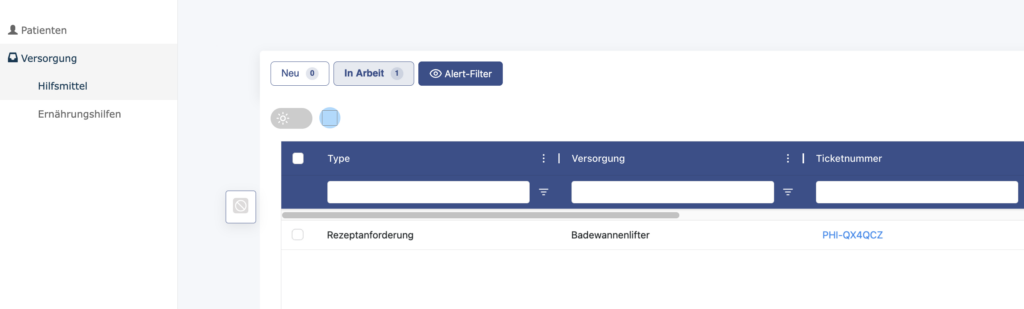
In the account of a supplier of assistive devices, you will find the tab “Supplies” in the left-hand column. >”Assistive devices” . There, the care partner receives an overview of the care processes assigned to them.
This overview provides a structured and user-friendly presentation of all processes related to assistive devices. Newly assigned provisioning processes can be found under the “New” button. Under “In Progress,” you’ll find an overview of your active tickets.
Customize the overview
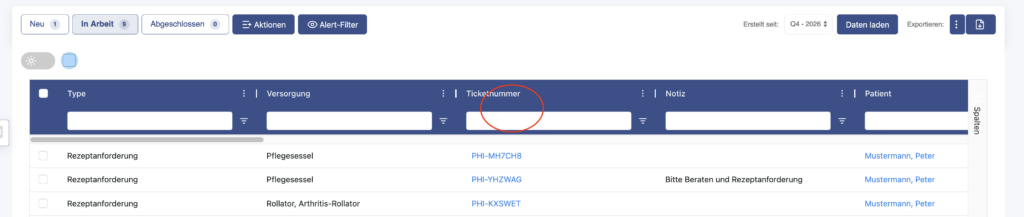
The columns in the overview can be customized. You can show or hide individual columns using the “Columns” feature on the right-hand side. You can also customize the order of the columns. To do this, hold down the mouse button and drag a column to the desired position.
Processing Multiple Supply Processes Simultaneously
In the future, service partners will be able to select multiple service requests at once and document the same status change for multiple tickets.
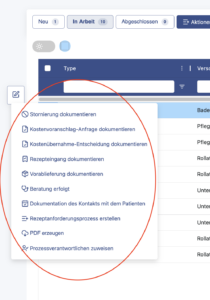
To do this, first select the desired tickets in the overview. Then click the pencil icon on the right. Using the action menu that opens there, the desired action can be performed simultaneously for all selected tickets.
For example, this allows the receipt of a prescription to be documented for multiple care processes in a single step.

Overview of Assistive Aids in the Patient Account
In the patient view, the “Care >, and Assistive Devices” tab allows you to view and edit the care processes for an individual patient. This gives care partners a quick overview of the current status of a patient’s care.
Details and Status of a Supply Process
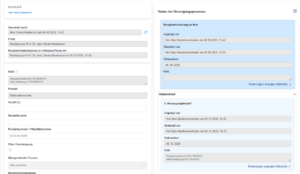
Clicking on the ticket number of a supply process opens the detailed view of the respective process.
The individual status steps of the care process and the interactions of the players involved are displayed there. This allows the progress and current status of care to be tracked transparently.
Create New Supply Processes
Through the new module, care partners can directly initiate a needs assessment process or a prescription request process for a medical device.
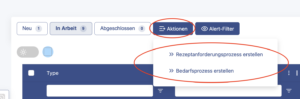
You can request a prescription by clicking the “Actions > Prescription Request Process” button. A requisition process is initiated by clicking the “Actions > Create Requisition Process” button. The “Actions” button is located in the upper-left corner, above the overview of a patient’s care processes.
Actions in a supply process
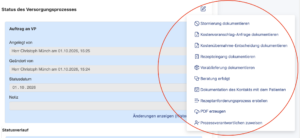
Within a care process, care partners can perform various actions. The action menu can be accessed in two places. On the care process details page, the menu is located behind the pencil icon in the upper-right corner of the care process. Alternatively, you can first select the desired process from a patient’s overview of care processes. You can then open the action menu for that process by clicking the pencil icon that appears.
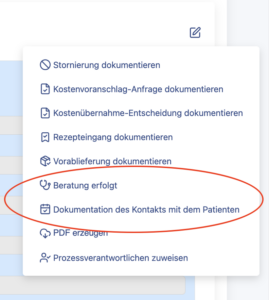
Available actions include, for example, documenting the receipt of a prescription, a request for a cost estimate, a decision to cover costs, an advance delivery, or a patient contact.
These functions support structured documentation and processing of the individual process steps.
An example of an action is “Create a prescription request process.”
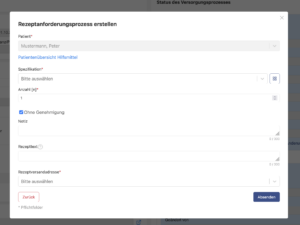
After selecting this option, a form will open where you can enter the information required for the prescription request. This includes, among other things, the medical device, the prescription text, and the desired shipping address for the prescription. The prescription request can then be sent directly to the outpatient clinic using the form.
Document consultation and initial contact
Consultation processes and the initial contact between the care provider and the patient can also be documented in the new module. The following functions are available for this purpose in the action menu of a care process:
- “Consultation has taken place”
- “Documentation of Contact with the Patient”
After selecting the action, a dialog box opens where you can enter the date of the action
The proven care process and case management will remain unchanged
The new Assistive Devices module changes the layout and navigation of the Care Portal, but does not alter the actual care process.
The established care process for assistive devices remains unchanged. Responsibilities and collaboration with our Assistive Devices Case Management team also remain the same as before.
Scheduled to go live on October 12, 2026
The new module has been thoroughly tested. However, if any errors or inconsistencies occur after it goes live, we would appreciate your feedback. Please send reports of potential bugs or suggestions for improvement to: info@ambulanzpartner.de.
Alternatively, you can contact Barbara Hildebrandt by phone at 0159 04005053.
We look forward to the launch of the new assistive device module and sincerely thank you for your support.